Smishing: What you need to know to keep yourself safe in 2026

About 400 million spam SMS messages are sent everyday in America alone. Most of them include malicious links to spoofed homepages designed to steal your sensitive information, such as bank details or your work email password. This is what is meant by smishing, and a single successful SMS scam has the potential to cost your business millions.
Here’s what you need to know to protect yourself from smishing attacks.
TeamPassword makes it easy to keep your accounts safe from cybercriminals. Don’t believe us? Sign up for a 14-day free trial today and try for yourself.
Table of Contents
What is smishing?
Here is a simple definition of smishing:
Smishing definition: Smishing, for SMS + phishing, is a cybersecurity attack that uses text messages to send malicious links to individuals in hopes of obtaining their sensitive information.
Simply put, smishing is the latest version of phishing. As a refresher, here’s the progression in cyberattack attack vectors from email through phone calls and now text messages:
-
Phishing uses emails to guide people towards spoofed homepages to steal data.
-
Vishing, for voice + phishing, uses the phone with a similar goal in mind—to get the person to divulge personal or corporate information that can be used in further cyberattacks.
-
Smishing is the latest evolution and takes advantage of the poor spam protection in place for SMS messaging.
Smishing statistics
According to Robokiller, over 19 billion spam SMS messages were sent in America in December 2023 alone, representing about 19 messages per person. Most of these are smishing scams.
To put that into perspective, that’s approximately 3 billion SMS scam messages sent per week in 2023, over 400 million per day, and nearly 300,000 per minute.
The most affected states by volume are California, Texas, Georgia, Florida, and New York.
Smishing tactics
Just like phishing and vishing, smishing attacks typically attempt to either entice you to click a link with the promise of a reward or scare you into clicking with the warning of some major financial loss.
As shown with real-world smishing examples in the next section, two common types of rewards are packages that couldn’t be delivered or cash that couldn’t be transferred. It’s easy to be fooled by these as the average family is ordering so much from Amazon that it can be hard to remember whether or not you are waiting on a delivery.
Likewise, digital cash apps have gone from niche business to the norm in the last five years, and they often provide little recourse if someone unwittingly transfers money as part of a scam.
On the other side, many smishing messages try to scare you into thinking an important account, usually a bank, streaming service, or telecom account, has been compromised and if you don’t check now something bad could happen. The sad irony, of course, is that if you click on their dangerous link and fill in your account details on their spoofed homepage, your account will in fact soon be compromised.
Smishing examples
To help prove the smishing stats above are accurate, here are some real world smishing examples from my iPhone over the last couple weeks. Note that I am in Canada, so while the particulars might be different (Canada Post not USPS, Rogers not AT&T, INTERAC e-Transfer not Venmo, CRA not IRS, and CIBC not BOA), the strategies should be all too familiar.
These real-world smishing examples display both the “reward” and “warning” style of SMS scams.
Reward-style smishing examples
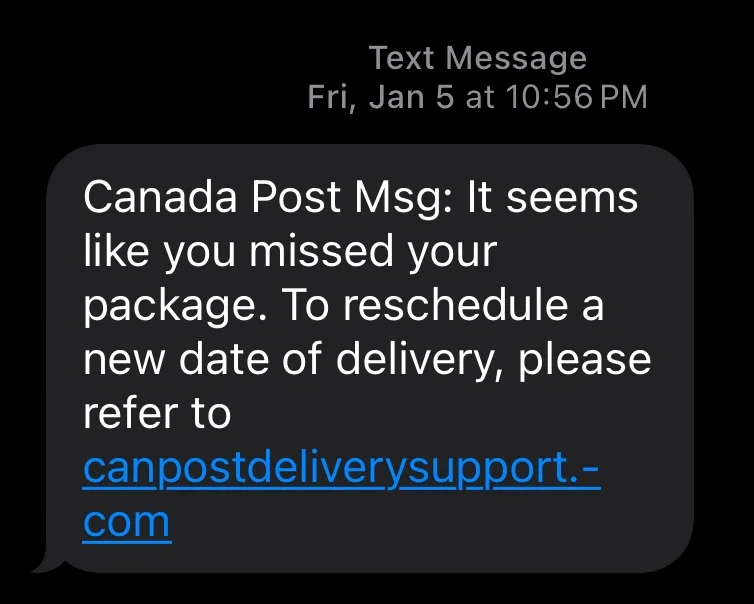
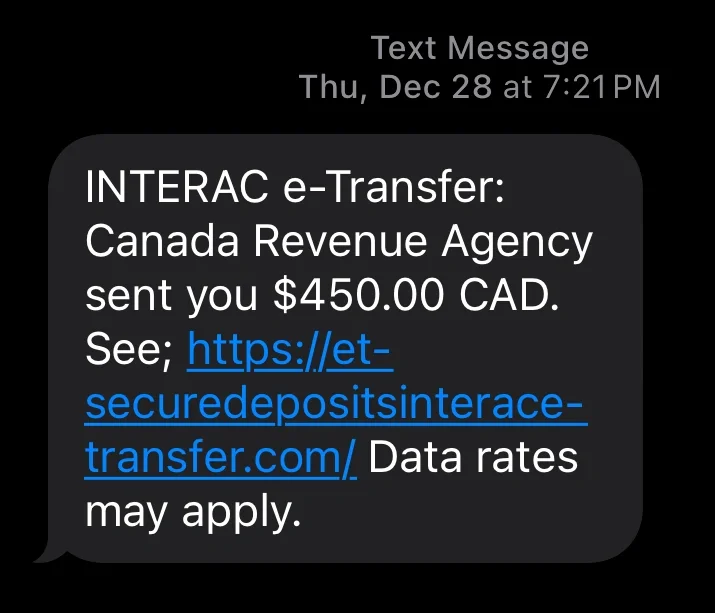
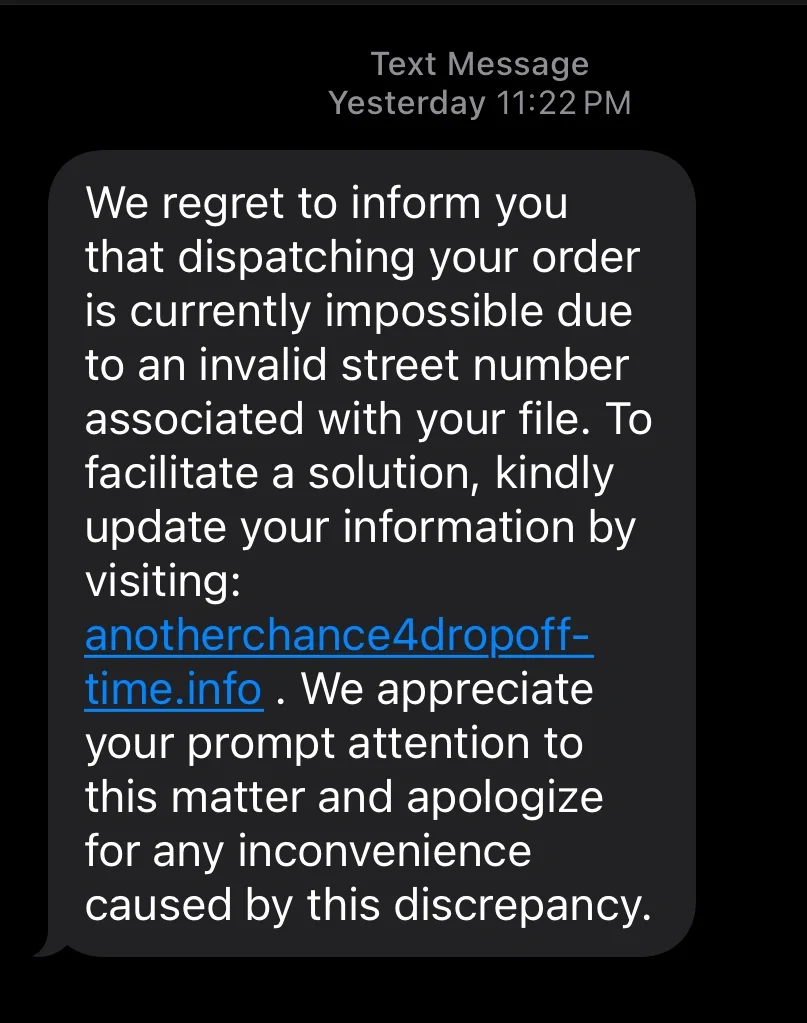
In these three examples, the smishing messages claim to be in possession of something that cannot be transferred without more information. Two are product deliveries which could not be safely dropped off at a house. They claim that, to get those deliveries, you must click the malicious links and provide further information.
In the third example, the scammers are claiming to be from Canada Revenue Agency (CRA), which is the equivalent to the IRS in America, which apparently owes the receiver $450 to be sent via INTERAC e-Transfer. To receive the funds, you will be asked to divulge your banking details.
Warning-style smishing examples
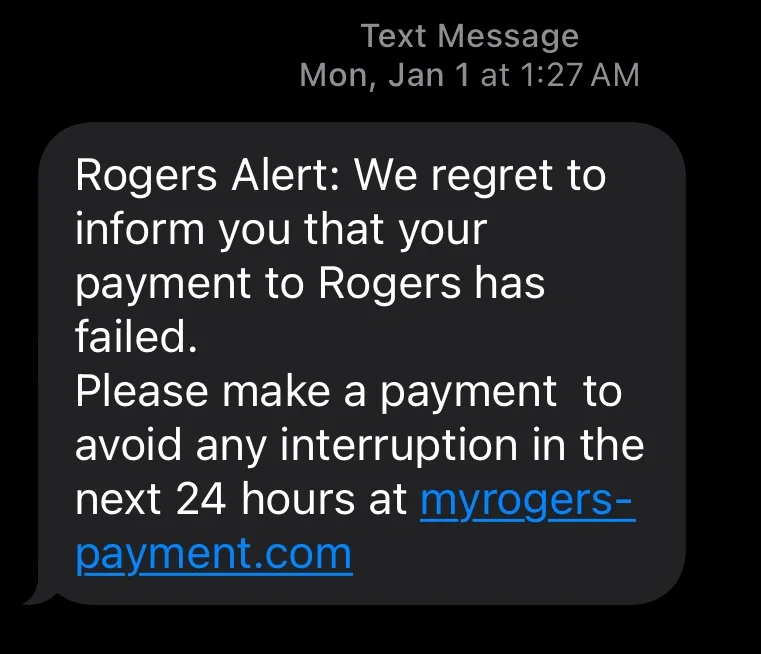
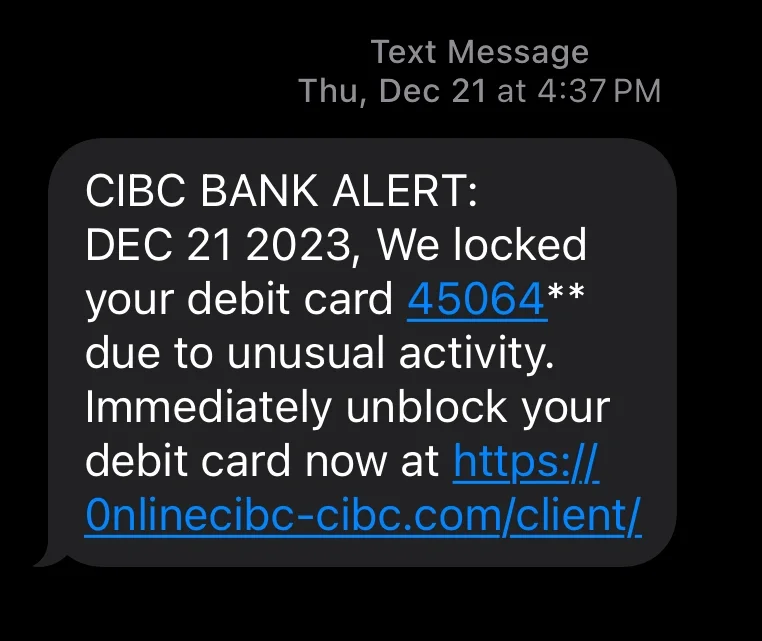
Here are some common examples of scare tactics used in smishing campaigns. In the first example, the criminals claim to work for Rogers, which is a major Internet, cable TV, and mobile phone provider in Canada. While logically most people know they are too valuable as customers to lose service within 24 hours of a missed payment, this is a very common part of a smishing message.
That’s because adding a ticking clock makes it more likely that someone will quickly click on the malicious link instead of double-checking their payment history on their banking app to see whether their last payment went through.
In the second case, the hackers are pretending to be a large bank in Canada (CIBC). If you don’t know already, debit cards issued by the same bank have the same first four digits. This added detail makes the SMS message seem more legitimate to those who don’t know that.
New and upcoming smishing tactics
While traditional reward and warning texts are still prevalent, cybercriminals are actively evolving their strategies to bypass modern security awareness. Keep an eye out for these emerging trends:
- Conversational AI Bots: Instead of immediately blasting a malicious link, attackers are deploying autonomous AI chatbots that start with a seemingly innocent "wrong number" text, a fake job recruitment offer, or a brief question. These bots use flawless grammar and are programmed to hold realistic, real-time conversations to build trust over multiple messages before finally dropping a dangerous link.
- MFA/2FA Bypass Scams: As more services require multi-factor authentication, smishing texts are now mimicking security alerts. You might receive a text saying, "Unauthorized login attempt detected. Reply with the code sent to your phone to block this action." In reality, the attacker is actively trying to log in, and you are unwittingly handing them the authentic 2FA code they need to breach your account.
- Multi-Channel "Vishing" Handoffs: SMS is increasingly being used as the initial hook for voice phishing (vishing). The text will claim there is a critical financial issue and instruct you to call a provided "customer support" number. Calling that number connects you to a highly convincing deepfake AI voice clone of a bank executive or IT support agent designed to extract your credentials verbally.
- Fake Toll and Transit Fees: A rapidly growing scam involves sending texts claiming you have an unpaid highway toll fee or a suspended transit pass. Because many local toll authorities legitimately use automated SMS billing, these messages are highly effective at creating a localized sense of urgency, driving victims to spoofed payment portals to harvest credit card data.
How do you prevent smishing attacks?
The sad truth is that governments seem unwilling to make strong laws against spam emails, phone calls, and text messages. Telecom companies are likewise unwilling to voluntarily take on the burden of protecting their clients from phishing, vishing, and smishing on their own. It’s too expensive, difficult, and it would open them up to liability if they took on the responsibility.
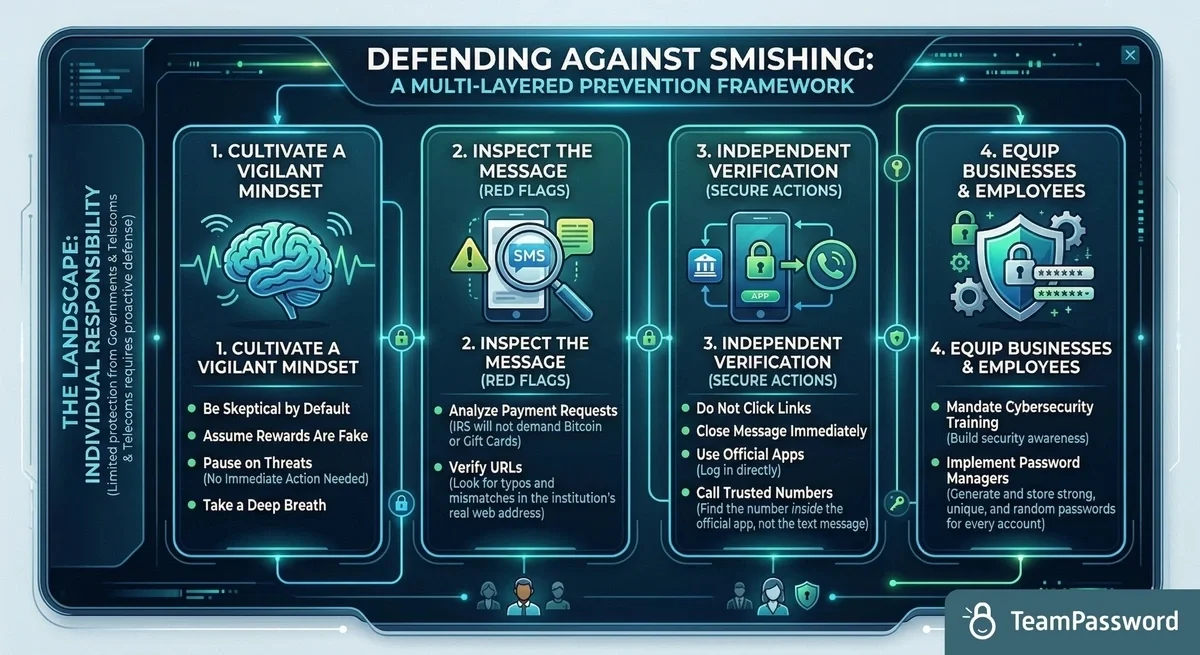
That means it is up to individuals to keep themselves safe against the dozens of SMS scams they will encounter every month. The most important thing you can do is be vigilant.
When you receive a text message or email, assume any rewards are too good to be true. Conversely, if it’s trying to scare you into an action, take a deep breath and know that nothing ever requires your immediate action.
Some smishing threats are easier to detect. For example, the IRS isn’t going to make you pay a debt with Bitcoin or Apple Store gift cards. However, even the seemingly legitimate ones have the telltale signs of scams. Look at the URL; usually, it is not the real web address of the institution.
If you are unsure, close the text message and go directly to your banking app. If something does seem wrong, get on the phone and call the bank. (Use the phone number listed in the app and not one in the text message!)
Along with general training around being skeptical, businesses can equip their employees with the tools needed to enhance their cybersecurity. Foremost among these is a password manager that generates and stores a unique, strong, and random password for each account.
Use TeamPassword to prevent smishing attacks
TeamPassword stores all of your usernames and passwords securely. While the bogus web addresses could fool an employee who is distracted or not trained to look, it won’t prompt your password manager to fill in your protected details.
Furthermore, by creating and securely storing unique, random, and strong passwords for each account, one mistake will never multiply to hackers having all of your credentials. Finally, having safe and easy ways to share accounts with coworkers means there is no need to ever share passwords through unsafe means, such as in a reply to a phishy text message.
TeamPassword can protect your important accounts from smishers. Don’t believe us? Sign up for a 14-day free trial today and try for yourself.
Posts Recomendados
The Ultimate Employee Offboarding Guide for Data Security
What’s the plan when an employee leaves? Properly handing off company information when an employee leaves can be ...
What is password encryption and how does it work?
Password encryption is the number one component of password security. TeamPassword encrypts passwords with state-of-the-art technology to keep ...
Cybersecurity for Utilities: Common Threats & Best Practices
The utilities sector is ripe for cyber threats. Learn more about these threats and how to prevent them ...
7 Cybersecurity Risks of Using Personal Devices for Work
Bring your own device policies are increasingly popular as remote work trends continue. With them come risks. This ...
Fortaleça a segurança das suas senhas
O melhor software para gerar e gerenciar suas senhas corretamente.